Android TV: application notifications on O+
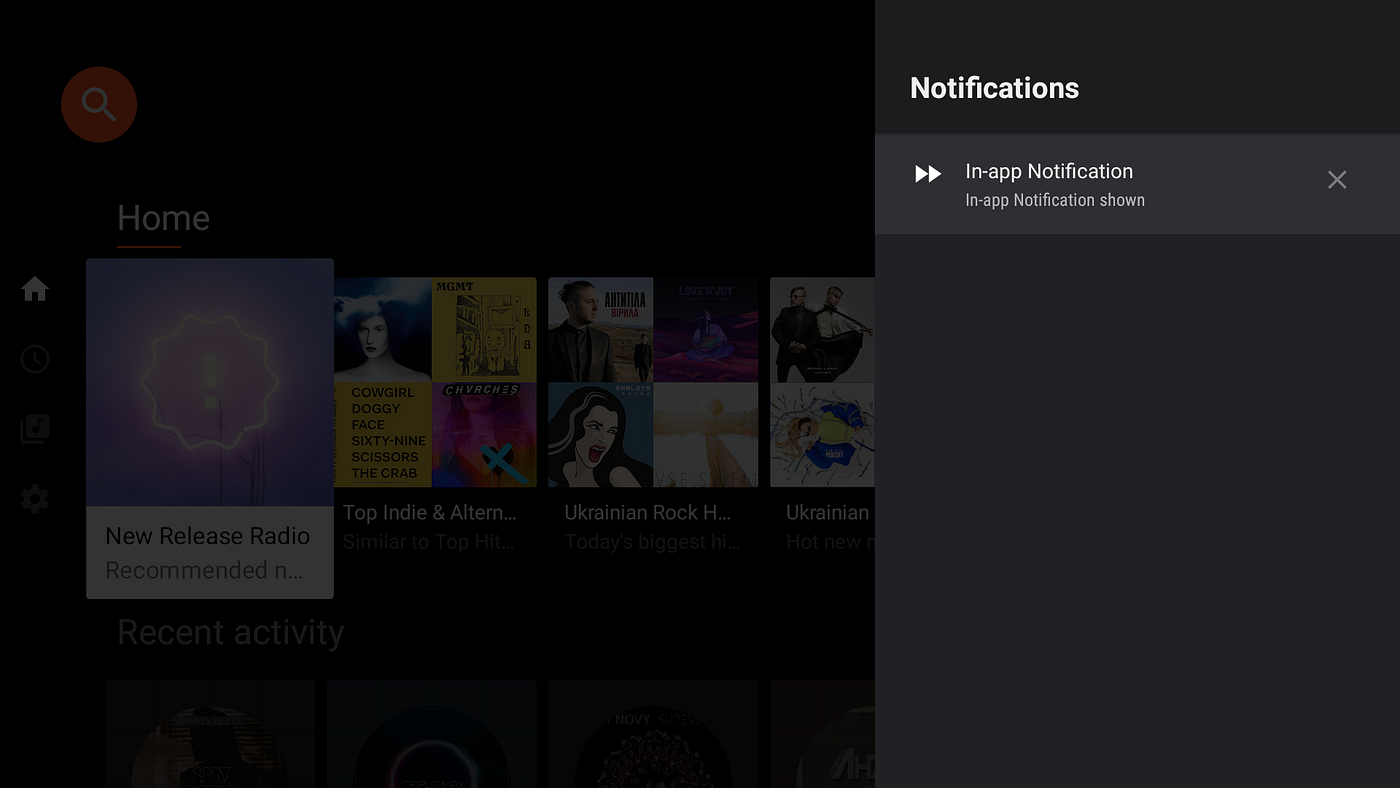
Although there are many articles that cover notifications in Android O and further versions, there is almost no information about notifications in Android TV platform. This topic is much more advanced and without the support of Google, it is almost impossible to resolve it.
Since I went all the path from the investigation on my own, comparing Google native application and receiving support from Google I want to share my experience to make this clear for other developers.
Android TV limitations
In case if you will follow any available tutorial to publish notification via notification channel on the Android TV — it will not work. In the logcat you will see the next message:
1
TVNotifService: skipped notification StatusBarNotification(pkg=com.my.application user=UserHandle{0} id=2 tag=MyChannel key=0|com.my.application|2|MyChannel|1000: Notification(channel=MyChannel pri=0 contentView=null vibrate=null sound=null tick defaults=0x0 flags=0x100 color=0xff048f80 category=sys vis=PUBLIC)) userId: 0
Notification is ignored, this seems totally unexpected to anybody who was working with the notification channels on Android phones, but due to Android TV specific UI/UX — notifications are allowed only for the system white-listed application.
AOSP Dependency
- You will need to have access to the AOSP sources to white-list your application and configure proper access to the system API.
Setup Wizard
We start from the setup wizard, under setup wizard I mean an application that has registered a receiver for the:
1
<action android:name="com.google.android.tvsetup.action.PARTNER_CUSTOMIZATION" />
This is an entry point for our customization. BTW: receiver itself could be empty but must be registered.
Configurations
Android provides specific broadcast for Android TV platform that is sent on the first boot of the firmware, we should register it in our setup wizard application:
1
2
3
4
5
<receiver android:name=".configuration.PartnerConfigurationReceiver">
    <intent-filter>
        <action android:name="com.google.android.tvlauncher.action.PARTNER_CONFIGURATION" />
    </intent-filter>
</receiver>
It is broadcasted only on the first boot of the system and notifies an application that we are reading system configurations. It could be used to load system/region specific customization from the external storage, server etc. Even if configuration file is saved in local storage this receiver should be registered.
Loaded configurations are saved in Android TV specific content provider, which we need to register as well:
1
2
3
4
5
<provider
    android:name=".configuration.ConfigurationProvider"
    android:authorities="tvlauncher.config"
    android:enabled="true"
    android:exported="true" />
After the first boot, this content provider will be read-only.
Configurations file
in our example will be stored locally in the Wizard Setup app:
res/raw/configuration.xml
In the configuration file we will be white-listing packages that can have access to the notification:
1
2
3
4
5
<configuration>
    <partner-package-notification-whitelist>
        <package-name>com.my.application</package-name>
    </partner-package-notification-whitelist>
</configuration>
Content provider read the configuration file and write it to the storage:
1
2
3
4
5
6
7
8
9
10
11
12
13
14
15
16
17
18
19
20
21
22
23
24
25
26
27
28
29
30
31
32
33
34
35
36
37
38
39
40
41
42
43
44
45
46
47
48
49
50
51
52
53
54
55
56
57
58
59
60
61
62
63
64
65
66
67
68
69
70
71
72
73
74
75
76
77
78
79
80
81
82
83
84
public class ConfigurationProvider extends ContentProvider {

    private static final String TAG = ConfigurationProvider.class.getSimpleName();
    private static final String CONFIG_AUTHORITY = "tvlauncher.config";
    private static final String CONFIGURATION_DATA = "configuration";
    private static final int MATCH_CONFIGURATION = 1;
    private static final UriMatcher sUriMatcher;

    static {
        sUriMatcher = new UriMatcher(UriMatcher.NO_MATCH);
        sUriMatcher.addURI(CONFIG_AUTHORITY, CONFIGURATION_DATA, MATCH_CONFIGURATION);
    }

    @Nullable
    @Override
    public ParcelFileDescriptor openFile(Uri uri, String mode) throws FileNotFoundException {
        final InputStream stream;
        switch (sUriMatcher.match(uri)) {
            case MATCH_CONFIGURATION:
                // In this example, the configuration file is static and resides in
                // the res/raw folder of the app.
                stream = getContext().getResources().openRawResource(R.raw.configuration);
                break;
            default:
                throw new UnsupportedOperationException();
        }

        final PipeDataWriter writer = new PipeDataWriter() {
            @Override
            public void writeDataToPipe(@NonNull ParcelFileDescriptor output,

                                        @NonNull Uri uri, @NonNull String mimeType,

                                        @Nullable Bundle opts, @Nullable Object args) {

                try (FileOutputStream out = new FileOutputStream(output.getFileDescriptor())) {
                    byte[] buffer = new byte[8192];
                    int count;
                    while ((count = stream.read(buffer)) != -1) {
                        out.write(buffer, 0, count);
                    }
                } catch (IOException e) {
                    Log.e(TAG, "Failed to send file " + uri, e);
                }
            }
        };
        return openPipeHelper(uri, "text/xml", null, null, writer);
    }

    @Override
    public boolean onCreate() {
        return true;
    }

    @Nullable
    @Override
    public Cursor query(Uri uri, String[] projection, String selection,
                        String[] selectionArgs, String sortOrder) {
        throw new UnsupportedOperationException();
    }

    @Nullable
    @Override
    public Uri insert(Uri uri, ContentValues values) {
        throw new UnsupportedOperationException();
    }

    @Override
    public int delete(Uri uri, String selection, String[] selectionArgs) {
        throw new UnsupportedOperationException();
    }

    @Override
    public int update(Uri uri, ContentValues values, String selection,
                      String[] selectionArgs) {
        throw new UnsupportedOperationException();
    }

    @Override
    public String getType(@NonNull Uri uri) {
        throw new UnsupportedOperationException();
    }

}
Last thing — posting of the notification. It is almost the same as on Android phone using Notification Channels:
1
2
3
4
5
6
7
8
9
10
11
12
13
14
15
16
17
18
19
20
21
22
23
24
25
26
27
28
29
30
31
32
33
34
35
36
37
38
39
40
41
42
public class NotificationWrapper {

    private static final String TAG = NotificationWrapper.class.getSimpleName();

    private static final String NOTIFICATION_CHANNEL_ID = TAG;
    private static final int NOTIFICATION_ID = 2;

    private NotificationManager getNotificationService(Context context) {
        return (NotificationManager) context.getSystemService(Context.NOTIFICATION_SERVICE);
    }

    public void createNotificationChannel(Context context) {
        final NotificationManager nm = getNotificationService(context);
        nm.createNotificationChannel(
                new NotificationChannel(NOTIFICATION_CHANNEL_ID,
                        context.getString(R.string.app_name),
                        NotificationManager.IMPORTANCE_MAX));
    }

    private Notification newNotification(Context context, String text) {
        final String title = context.getString(R.string.app_name);
        return new Notification.Builder(this, NOTIFICATION_CHANNEL_ID)
                .setSmallIcon(R.drawable.lb_ic_fast_forward)
                .setLocalOnly(true)
                .setColor(context.getResources().getColor(R.color.lb_background_protection))
                .setContentTitle(title)
                .setTicker(title)
                .setContentText(text)
                .setStyle(new Notification.BigTextStyle().bigText(text))
                .setVisibility(Notification.VISIBILITY_PUBLIC)
                .setCategory(Notification.CATEGORY_SYSTEM)
                //MUST HAVE. Available only on the Android TV platform.
                .extend(new Notification.TvExtender().setSuppressShowOverApps(true))
                .build();
    }

    public void showNotification(Context context, String status) {
        final NotificationManager nm = getNotificationService(context);
        nm.notify(TAG, NOTIFICATION_ID, newNotification(context, status));
    }

}
The only platform-specific changes that are required to post notification:
1
.extend(new Notification.TvExtender().setSuppressShowOverApps(true))
This extension is a system private API and available only for the embedded application. To make private API available to the application on the AOSP we need to add one line to the Android.mk:
1
LOCAL_PRIVATE_PLATFORM_APIS := true
Conclusion
Google has its reasons to disable notifications as they are on the Android TV platform, therefore don’t misuse acquired knowledge.
Good luck!
Originally published on Medium.