Rust & cross-platform mobile development
Recently I started to investigate options to share business logic between Android & iOS. This investigation leads me to Rust — very interesting and relatively new programing language so I decided to give it a try.
What is Rust?
Two most important point from the documentation:
Rust is blazingly fast and memory-efficient: with no runtime or garbage collector, it can power performance-critical services, run on embedded devices, and easily integrate with other languages.
It is a native-level language like C++.
Rust’s rich type system and ownership model guarantee memory-safety and thread-safety — enabling you to eliminate many classes of bugs at compile-time.
Its compiler will try to save you from common memory mistakes.
Is it popular?
Based on the 2019 survey, Rust is one of the most loved & wanted among engineers (why?):
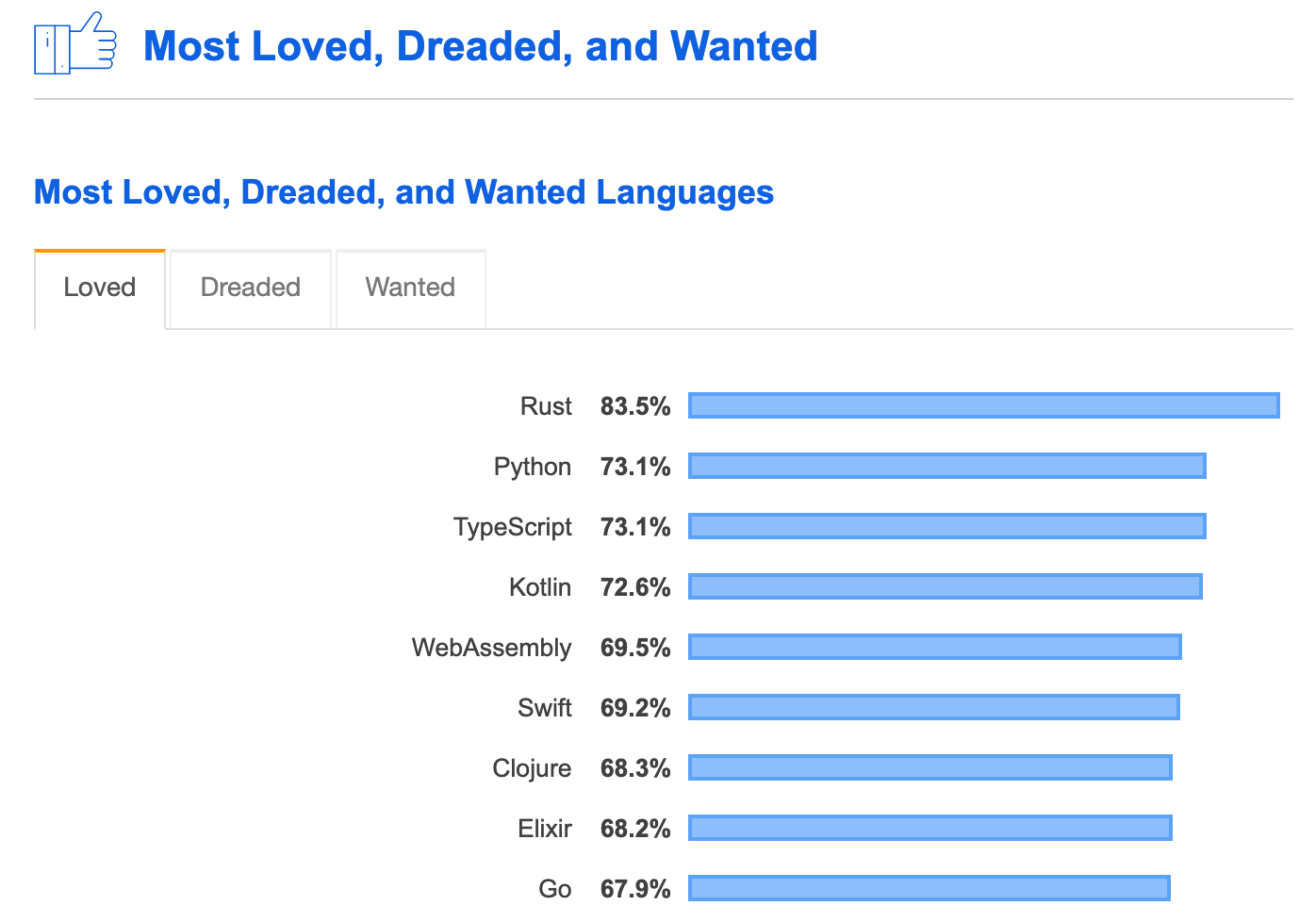
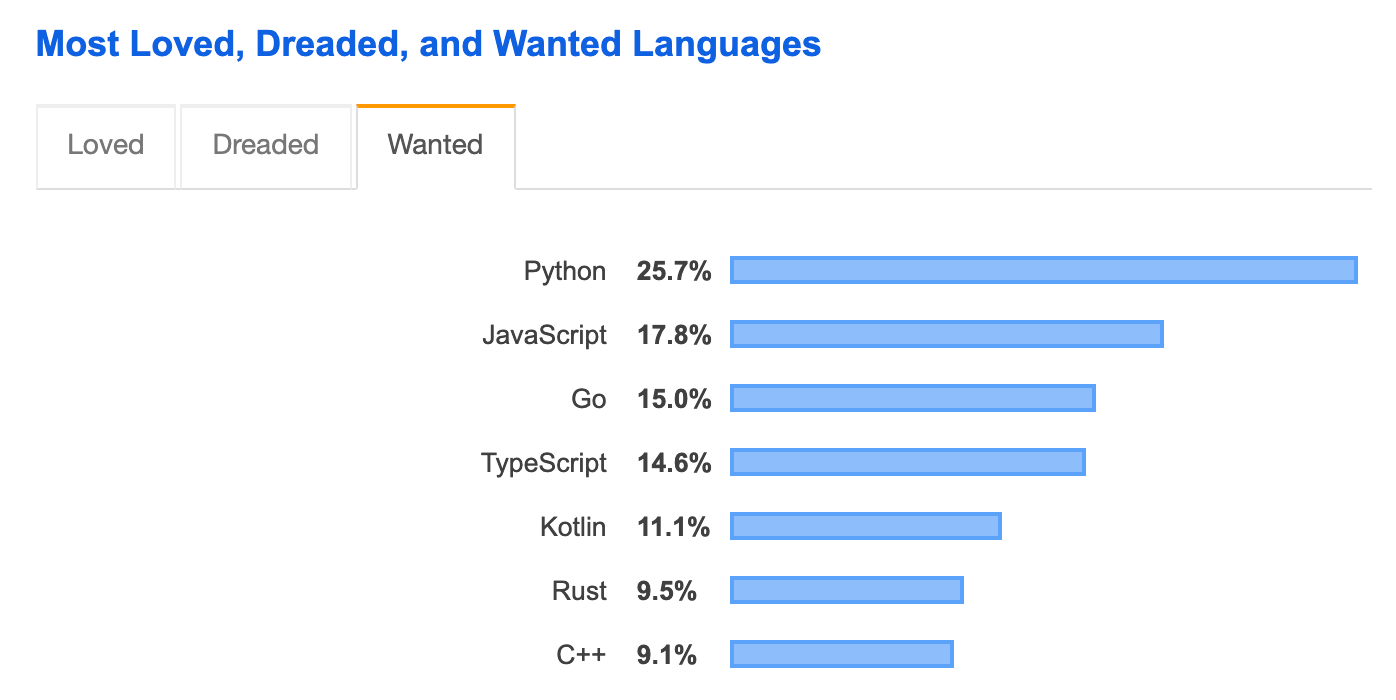
source: https://insights.stackoverflow.com/survey/2019/#technology-_-most-loved-dreaded-and-wanted-languages
General trends are not that great:
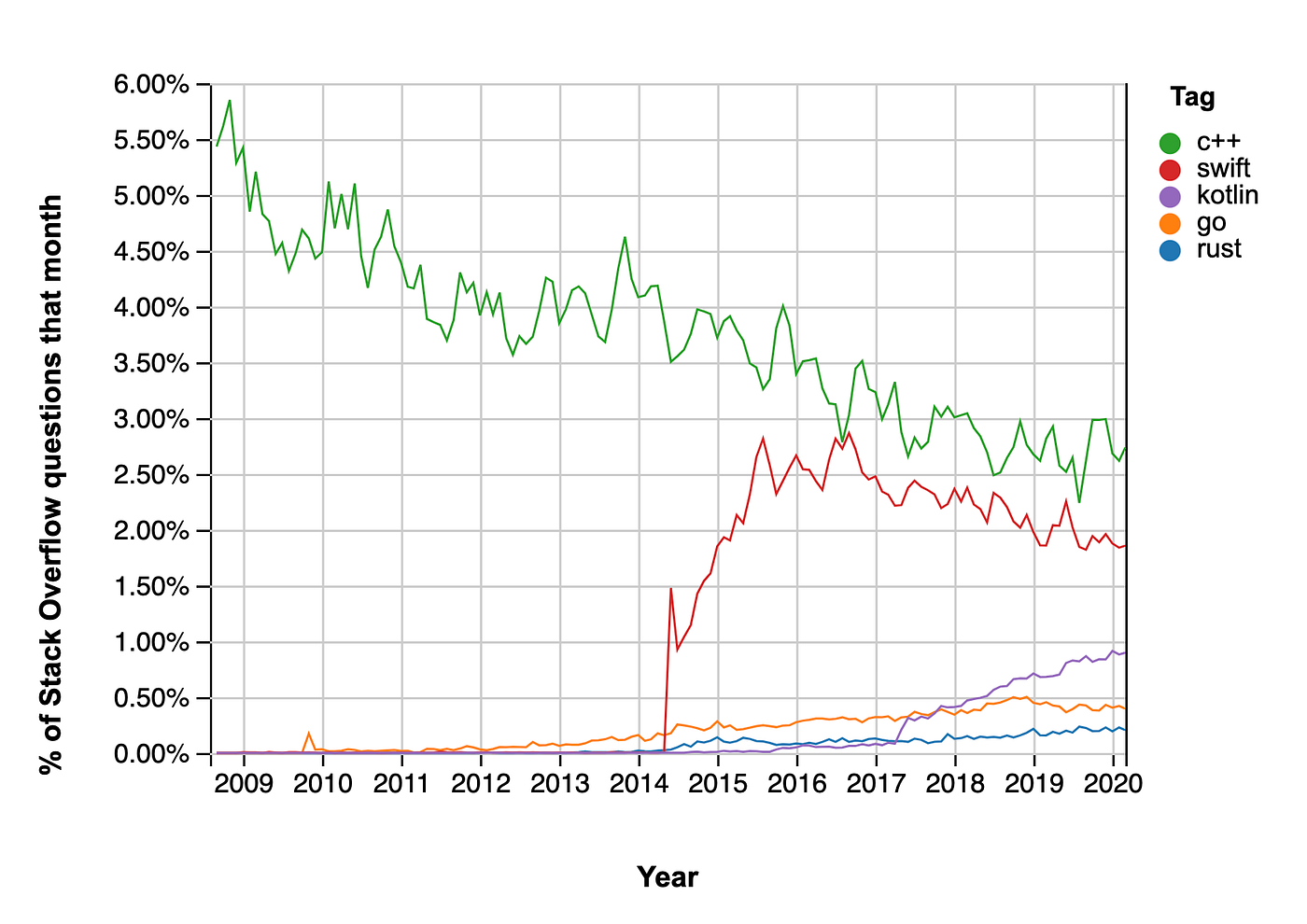
https://insights.stackoverflow.com/trends?tags=rust%2Cgo%2Cc%2B%2B%2Cswift%2Ckotlin
The first appearance of the language was in 2010 almost at the same time as Go (2009). Version 1.0 was released in 2015, but they are still adding a lot of new features based on user demand.
Unfortunately, so far it is used only in a few big companies.
How good is it?
Probably the first thing you should worry about is performance. Rust is probably one of the best, here are some benchmarking (left to right):
- Rust vs Go;
- Rust vs Swift;
- Rust vs C++.
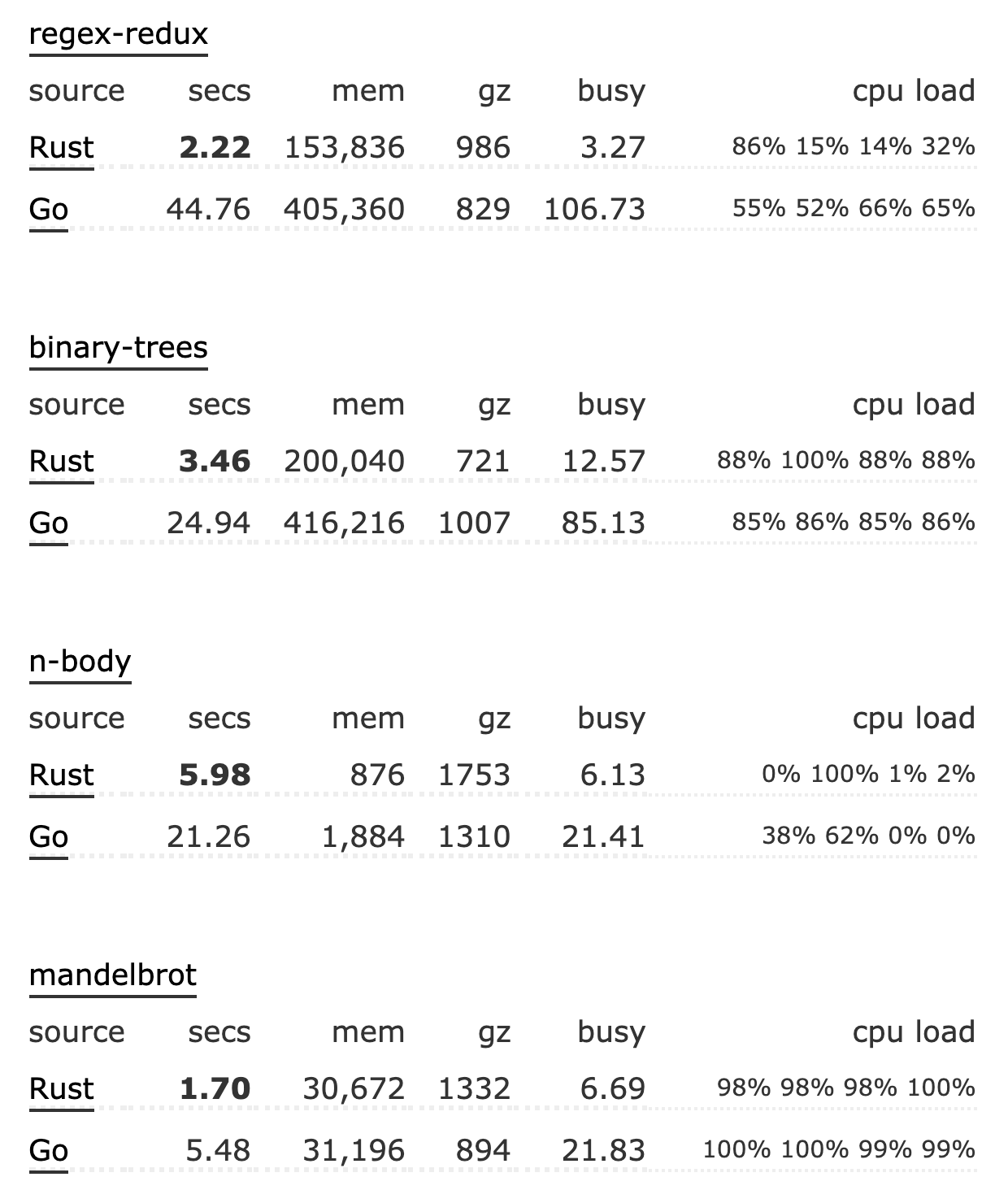
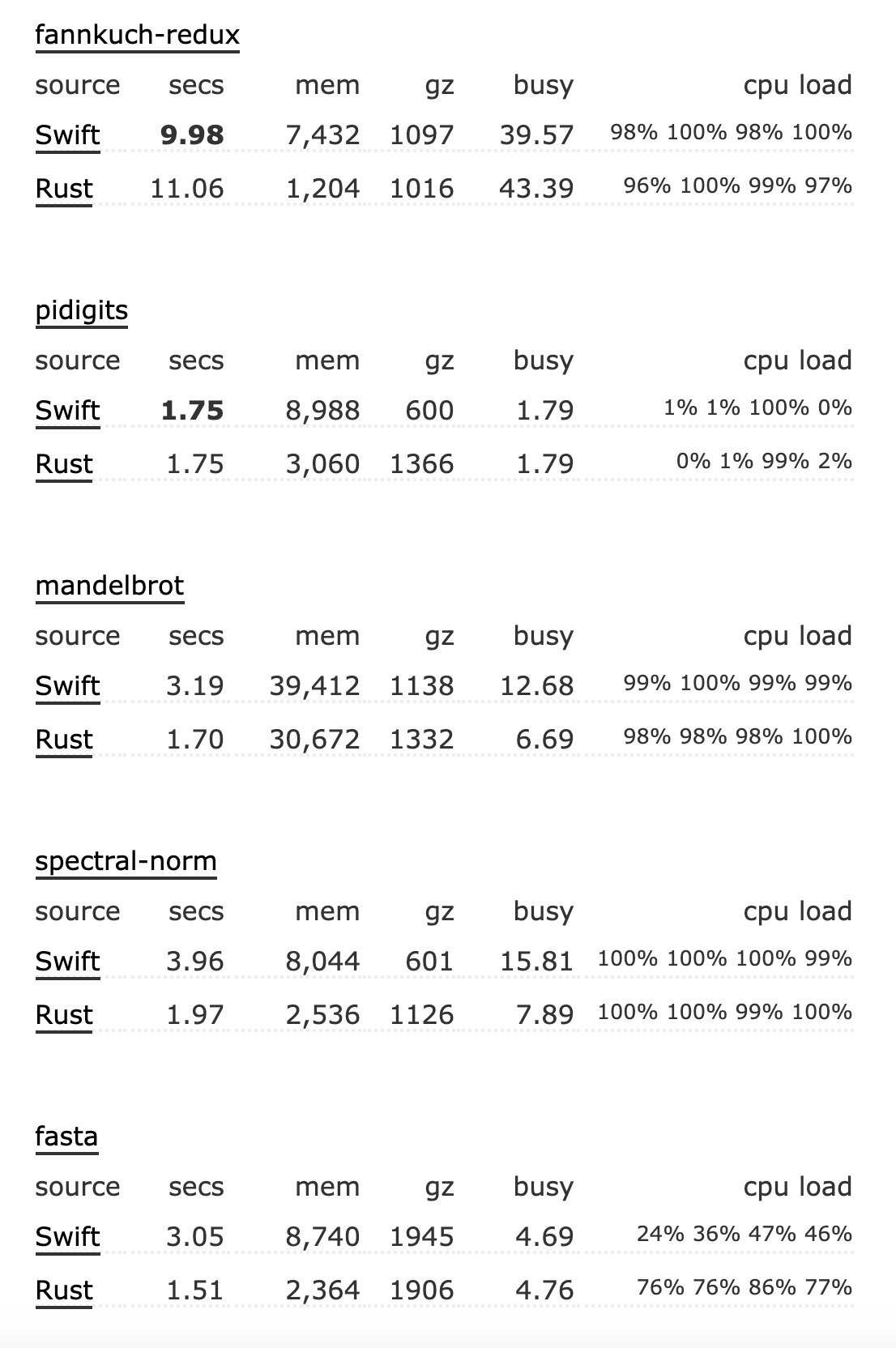
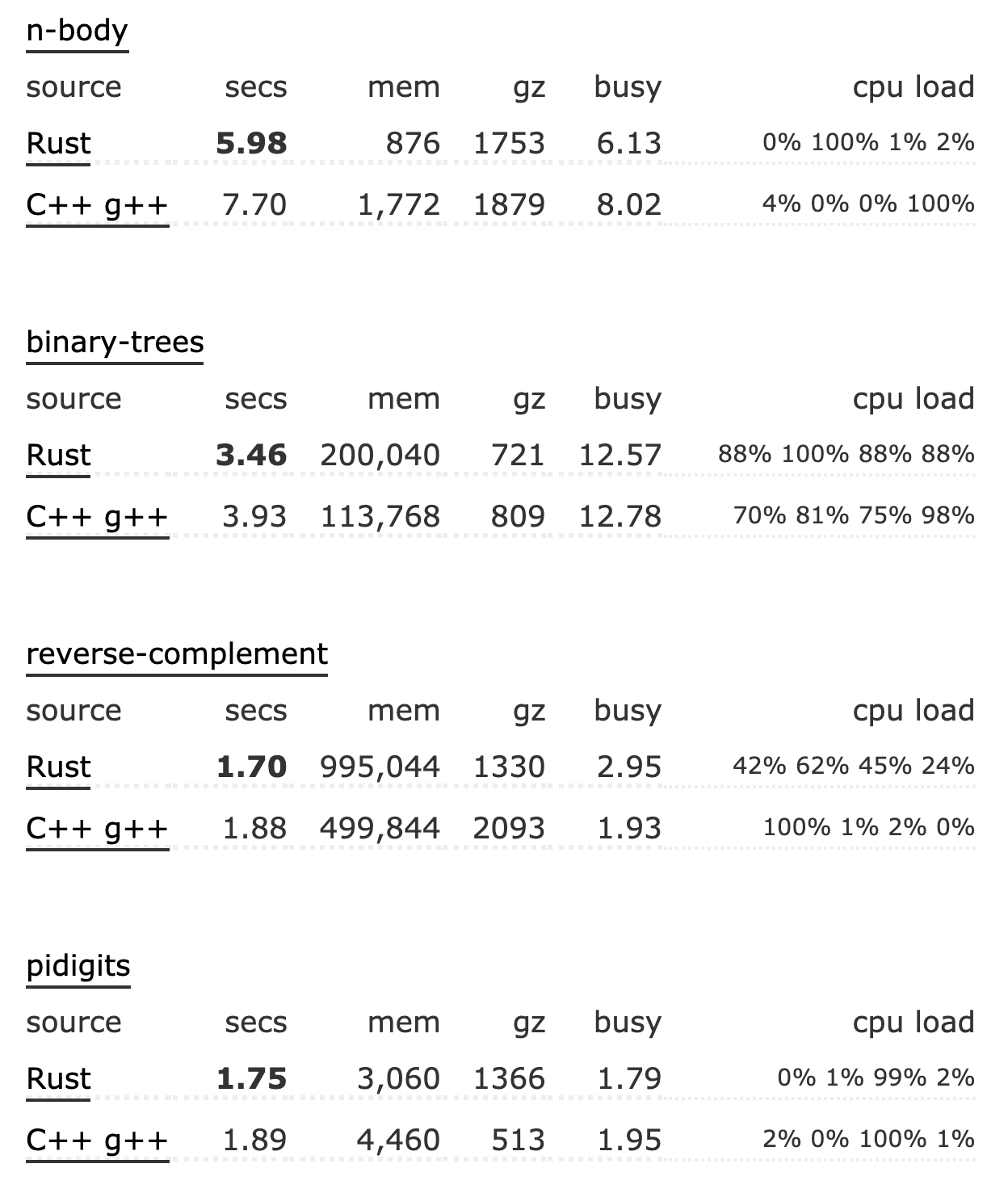

Source: https://benchmarksgame-team.pages.debian.net/benchmarksgame/fastest/rust.html
On average it is comparable to C/C++ and can be slightly faster than Swift. Of course, it depends on the task and implementation.
Go or Java is usually 10 positions lower than Rust.
Readability
Let’s check next code snippet - implementation of the bubble sort:
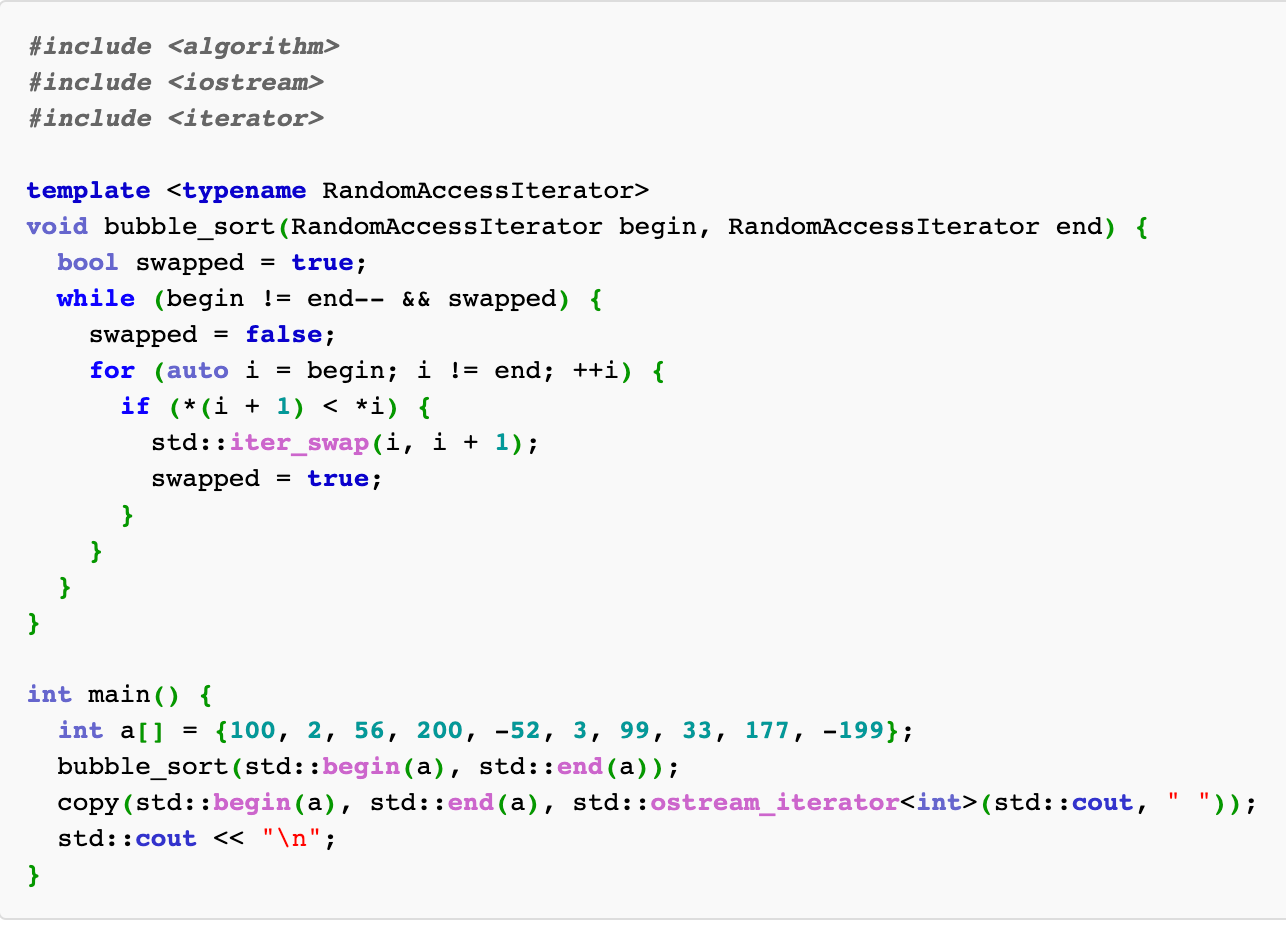
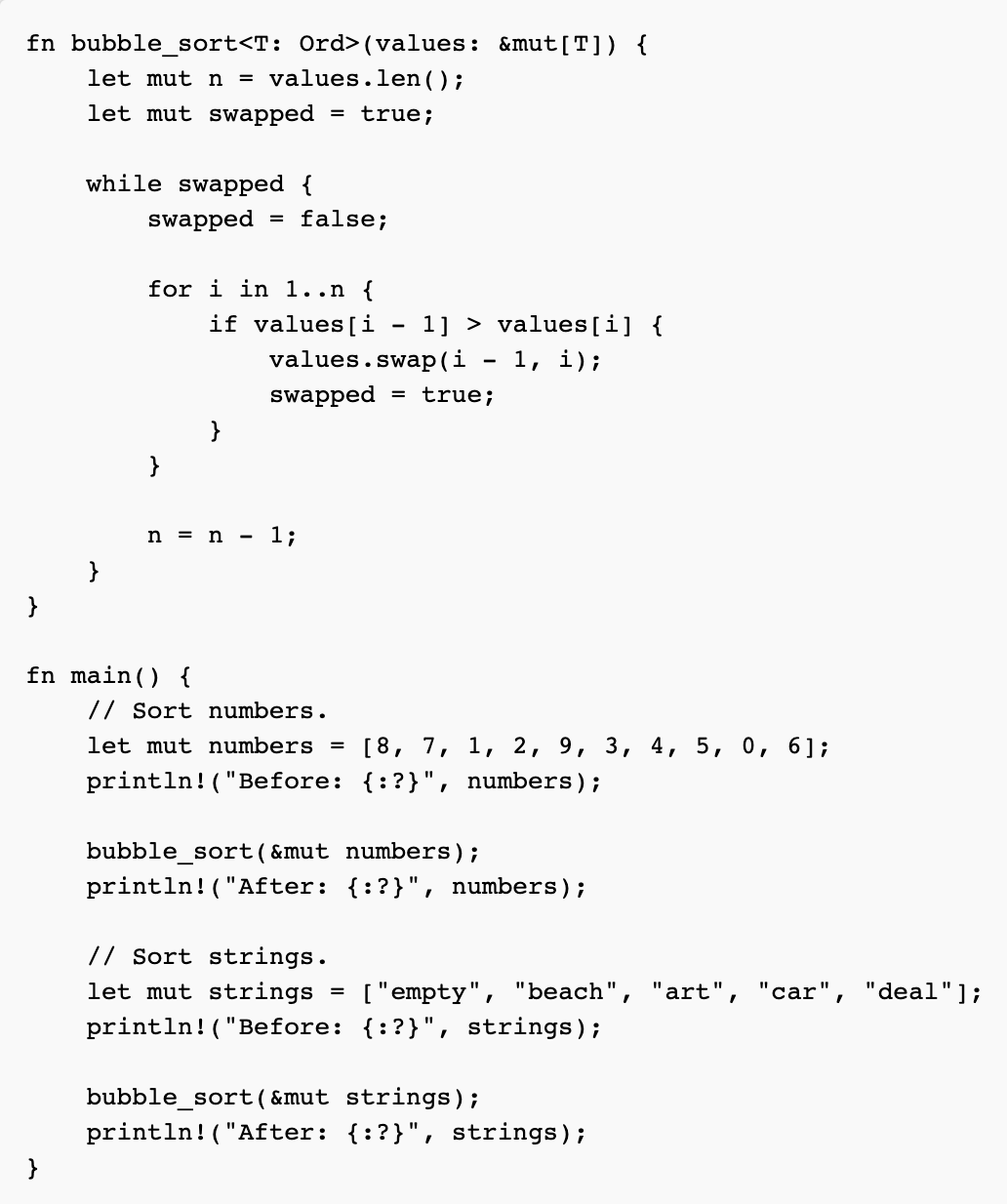
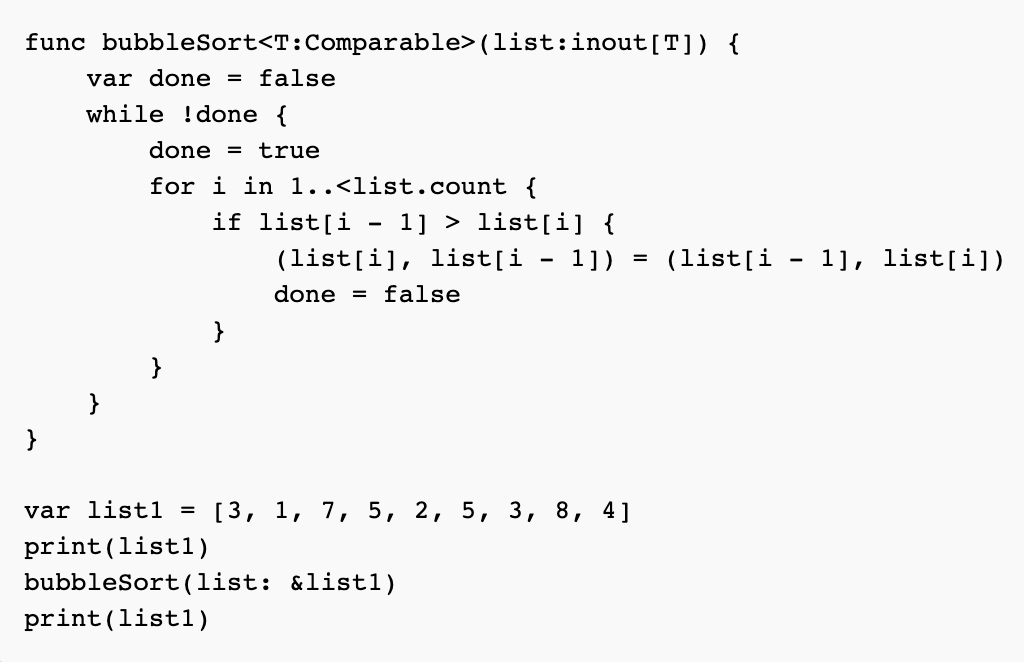
Left to right: C++, Rust, Swift. Source https://rosettacode.org/wiki/Sorting_algorithms/Bubble_sort
- Syntax wise it is close to Swift;
- It is more done in an idiomatic way: readable and understandable.
Safety
Another common problem with C++which is addressed in Rust is memory safety. Rust guaranteed memory safety at the compile-time and makes it hard (but still possible) to create a memory leak. At the same time, it provides a rich set of features to manage memory on your own — it can be safe or unsafe.
Mobile
I reviewed the official examples from Rust and many other projects on GitHub, but they definitely were not close to the real mobile application use case. So it was very hard to estimate the complexity of real-life projects or efforts to switch to Rust. That is why I decided to create an example that will cover the most important aspects for me:
- networking;
- multithreading;
- data serialization.
Backend
For the backend, to simplify efforts I decided to pick StarWars API.
You can create a simple Rust server based on this official example.
Environment
To set up the environment and create IOS & Android application you can follow the official examples, they are very detailed and simple:
Android example is slightly out-of-date. If you are using NDK 20+, you don’t need to create your own toolchain, you can skip this step:
1
2
3
4
mkdir NDK
${NDK_HOME}/build/tools/make_standalone_toolchain.py — api 26 — arch arm64 — install-dir NDK/arm64
${NDK_HOME}/build/tools/make_standalone_toolchain.py — api 26 — arch arm — install-dir NDK/arm
${NDK_HOME}/build/tools/make_standalone_toolchain.py — api 26 — arch x86 — install-dir NDK/x86
Instead, add your NDK bundle and precompiled toolchain to PATH:
1
2
export NDK_HOME=/Users/$USER/Library/Android/sdk/ndk-bundle
export PATH=$NDK_HOME/toolchains/llvm/prebuilt/darwin-x86_64/bin:$PATH
And put this in cargo-config.toml:
1
2
3
4
5
6
7
8
9
[target.aarch64-linux-android]
ar = "<NDK_HOME>/toolchains/llvm/prebuilt/darwin-x86_64/bin/aarch64-linux-android-ar"
linker = "<NDK_HOME>/toolchains/llvm/prebuilt/darwin-x86_64/bin/aarch64-linux-android21-clang"
[target.armv7-linux-androideabi]
ar = "<NDK_HOME>/toolchains/llvm/prebuilt/darwin-x86_64/bin/arm-linux-androideabi-ar"
linker = "<NDK_HOME>/toolchains/llvm/prebuilt/darwin-x86_64/bin/armv7a-linux-androideabi21-clang"
[target.i686-linux-android]
ar = "<NDK_HOME>/toolchains/llvm/prebuilt/darwin-x86_64/bin/i686-linux-android-ar"
linker = "<NDK_HOME>/toolchains/llvm/prebuilt/darwin-x86_64/bin/i686-linux-android21-clang"
Multithreading, HTTP client and data deserialization
Rust provides a pretty solid API for networking with next libraries:
- Tokio runtime & Async/.await framework
- Reqwest — simple HTTP client
- Serde — JSON serialization/deserialization library
Here is an example of how you can combine these to create SWAPI(StarWars API) client with a few lines of code:
1
2
3
4
5
6
7
8
9
10
11
12
13
14
15
16
17
18
19
20
21
22
23
24
25
26
27
28
29
30
31
32
33
34
35
36
37
38
39
40
41
42
43
44
45
46
//Custom threaded runtime
lazy_static! {
static ref RUN_TIME: tokio::runtime::Runtime = tokio::runtime::Builder::new()
    .threaded_scheduler()
    .enable_all()
    .build()
    .unwrap();
}
//URL
const DATA_URL_LIST: &str = "https://swapi.dev/api/people/";
//Response DTO
#[derive(Default, Debug, Clone, PartialEq, Serialize, Deserialize)]
pub struct ResponsePeople {
    pub count: i64,
    pub next: String,
    pub results: Vec<People>,
}
//People DTO, i removed a few field to simplify example
#[derive(Default, Debug, Clone, PartialEq, Serialize, Deserialize)]
pub struct People {
    pub name: String,
    pub height: String,
    pub mass: String,
    pub gender: String,
    pub created: String,
    pub edited: String,
    pub url: String,
}

//async keyword mean that it return Future.
pub async fn load_all_people() -> Result<(ResponsePeople), Box<dyn std::error::Error>> {
    println!("test_my_data: start");
    let people: ResponsePeople = reqwest::get(DATA_URL_LIST)
        .await?
        .json()
        .await?;
    Ok(people)
}

//Test in main
#[tokio::main] //macro to create runtime
async fn main() -> Result<(), Box<dyn std::error::Error>> {
  let future = load_all_people();
  block_on(future);//block program till future finishes
  Ok(())
}
lazy_statlic — A macro for declaring lazily evaluated statics.
Communication
We come to the complicated part: communication between IOS/Android and Rust.
For this, we will use FFI. It uses C-interop to do communication and supports only C compatible types. Communication with C-interop could be tricky. IOS & Android has own limitation and best ways of handling this, let’s check it one by one.
To simplify data transfer you can also use byte transfer protocols: ProtoBuf, FlatBuffer. Both protocols support Rust, but I exclude them from this exercise because they have a performance overhead.
Android
Communication with the Java environment is done through the JNIEnv instance. Here is a simple example which returns a string in the callback in the same thread:
1
2
3
4
5
6
7
8
9
 #[no_mangle]
    #[allow(non_snake_case)]
    pub extern "C" fn Java_com_rust_app_MainActivity_callback(env: JNIEnv, _class: JClass, callback: JObject) {
        let response = env.new_string("Callback from Rust").expect("Couldn't create java string!");
        env.call_method(
          callback, "rustCallbackResult",
          "(Ljava/lang/String;)V",
          &[JValue::from(JObject::from(response))]).unwrap();
    }
It looks simple, but this method has a limitation. JNIEnv cannot be simply shared between threads because it doesn’t implement Send trait (trait == protocol/interface). If you wrap call_method in separate thread it will fail with a corresponding error. Yes, you can implement Send on your own as well as Copy and Clone but to avoid boilerplate code we can use the rust_swig.
Rust swig is based on the same principles as SWIG — it is using DSL and code generation to provide an implementation for you. Here is an example of pseudocode for Rust SwapiClient we defined before:
1
2
3
4
5
6
7
8
9
10
11
12
13
14
15
16
17
18
19
20
21
22
foreign_class!(class People {
    self_type People;
    private constructor = empty;
    fn getName(&self) -> &str {
        &this.name
     }
    fn getGender(&self) -> &str {
        &this.gender
    }
});

foreign_interface!(interface SwapiPeopleLoadedListener {
    self_type SwapiCallback + Send;
    onLoaded = SwapiCallback::onLoad(&self, s: Vec<People>);
    onError = SwapiCallback::onError(&self, s: &str);
});

foreign_class!(class SwapiClient {
    self_type SwapiClient;
    constructor SwapiClient::new() -> SwapiClient;
    fn SwapiClient::loadAllPeople(&self, callback: Box<dyn SwapiCallback + Send>);
});
Besides Rust wrapper, it will generate Java code for you as well, here is an example of auto-generated SwapiClient class:
1
2
3
4
5
6
7
8
9
10
11
12
13
14
15
16
17
18
19
20
21
22
23
24
25
26
27
28
29
30
31
32
33
34
35
36
37
public final class SwapiClient {

    public SwapiClient() {
        mNativeObj = init();
    }

    private static native long init();

    public final void loadAllPeople(@NonNull SwapiPeopleLoadedListener callback) {
        do_loadAllPeople(mNativeObj, callback);
    }

    private static native void do_loadAllPeople(long self, SwapiPeopleLoadedListener callback);

    public synchronized void delete() {
        if (mNativeObj != 0) {
            do_delete(mNativeObj);
            mNativeObj = 0;
       }
    }
    @Override
    protected void finalize() throws Throwable {
        try {
            delete();
        }
        finally {
             super.finalize();
        }
    }
    private static native void do_delete(long me);

    /*package*/ SwapiClient(InternalPointerMarker marker, long ptr) {
        assert marker == InternalPointerMarker.RAW_PTR;
        this.mNativeObj = ptr;
    }
    /*package*/ long mNativeObj;
}
The only limitation here, that you’ll need to declare a separate getter method for each field of the DTO. Good point is that it could be declared inside of DSL. The library has a rich list of configurations that you can find in the documentation.
Also, in the rust-swig repo, android-example, you can find integration with Gradle.
IOS
Since Swift doesn’t require any proxy (like JNIEnv) to communicate with Rust, we can use FFI directly, but still, there are many options on how to provide access to data:
- Expose C compatible DTO.
For each DTO you need to create a C-compatible copy and map to it before sending it to Swift. - Expose pointer to struct without any fields.
Create a getter for each field in FFI which takes a pointer to the host object as param.Here is also two possible variations:
2.1. the method canreturna result from getter;
2.2. or you can pass a pointer to populate with value as a parameter; (for C string you’ll need a pointer to start of char array and its length)
Let’s check the implementation of both approaches.
Approach #1
1
2
3
4
5
6
7
8
9
10
11
12
13
14
15
16
17
18
19
20
21
22
23
24
25
26
27
28
29
30
31
32
33
34
35
36
37
38
39
40
41
42
43
44
45
46
47
48
49
50
51
52
53
54
55
56
57
58
59
60
61
62
63
64
65
66
67
68
69
70
71
72
73
74
//Create client
#[no_mangle]
pub extern "C" fn create_swapi_client() -> *mut SwapiClient {
    Box::into_raw(Box::new(SwapiClient::new()))
}

//Release memory
#[no_mangle]
pub unsafe extern "C" fn free_swapi_client(client: *mut SwapiClient) {
    assert!(!client.is_null());
    Box::from_raw(client);
}

//you need reference to owner context to return data
#[allow(non_snake_case)]
#[repr(C)]
pub struct PeopleCallback {
    owner: *mut c_void,
    onResult: extern fn(owner: *mut c_void, arg: *const PeopleNativeWrapper),
    onError: extern fn(owner: *mut c_void, arg: *const c_char),
}

impl Copy for PeopleCallback {}

impl Clone for PeopleCallback {

    fn clone(&self) -> Self {
        *self
    }

}

unsafe impl Send for PeopleCallback {}

impl Deref for PeopleCallback {
    type Target = PeopleCallback;

    fn deref(&self) -> &PeopleCallback {
        &self
    }
}

#[no_mangle]
pub unsafe extern "C" fn load_all_people(client: *mut SwapiClient, outer_listener: PeopleCallback) {
    assert!(!client.is_null());

    let local_client = client.as_ref().unwrap();
    let cb = Callback {
        result: Box::new(move |result| {
            let mut native_vec: Vec<PeopleNative> = Vec::new();
            for p in result {
                let native_people = PeopleNative {
                    name: CString::new(p.name).unwrap().into_raw(),
                    gender: CString::new(p.gender).unwrap().into_raw(),
                    mass: CString::new(p.mass).unwrap().into_raw(),
                };
                native_vec.push(native_people);
            }

            let ptr = PeopleNativeWrapper {
                array: native_vec.as_mut_ptr(),
                length: native_vec.len() as _,
            };

            (outer_listener.onResult)(outer_listener.owner, &ptr);
        }),
        error: Box::new(move |error| {
            let error_message = CString::new(error.to_owned()).unwrap().into_raw();
            (outer_listener.onError)(outer_listener.owner, error_message);
        }),
    };
    let callback = Box::new(cb);
    local_client.loadAllPeople(callback);
}
On the Swift side we will need to to use UnsafePointer and other variations of a raw pointer to unwrap data:
1
2
3
4
5
6
7
8
9
10
11
12
13
14
15
16
17
18
19
20
21
22
23
24
25
26
27
28
29
30
31
32
33
34
35
36
37
38
39
40
41
42
43
44
45
46
47
48
49
50
51
52
53
54
55
56
57
58
59
60
61
62
63
64
65
66
67
68
69
70
71
/Wrapper for Rust SwapiClient
class SwapiLoader {

  private let client: OpaquePointer

  init() {
    client = create_swapi_client()
  }

  deinit {
    free_swapi_client(client)
  }

  func loadPeople(resultsCallback: @escaping (([People]) -> Void), errorCallback: @escaping (String) -> Void) {

    //We cannot call callback from C context, we need to send reference to callback to C
    let callbackWrapper = PeopleResponse(onSuccess: resultsCallback, onError: errorCallback)

    //pointer to callback class
    let owner = UnsafeMutableRawPointer(Unmanaged.passRetained(callbackWrapper).toOpaque())

    //C callback results
    var onResult: @convention(c) (UnsafeMutableRawPointer?, UnsafePointer<PeopleNativeWrapper>?) -> Void = {
      let owner: PeopleResponse = Unmanaged.fromOpaque($0!).takeRetainedValue()
      if let data:PeopleNativeWrapper = $1?.pointee {
        print("data \(data.length)")
        let buffer = data.asBufferPointer
        var people = [People]()
        for b in buffer {
          people.append(b.fromNative())
        }
        owner.onSuccess(people)
      }
    }

    //C callback error
    var onError: @convention(c) (UnsafeMutableRawPointer?, UnsafePointer<Int8>?) -> Void = {
      guard let pointer = $1 else {return;}
      let owner: PeopleResponse = Unmanaged.fromOpaque($0!).takeRetainedValue()
      let error = String(cString: pointer)
      owner.onError(error)
    }

    //Callback struct defined in Rust
    var callback = PeopleCallback (
      owner: owner,
      onResult: onResult,
      onError: onError
    )

    load_all_people(client, callback)
  }

}

//Helper to change context from Rust to Swift
class PeopleResponse {
  public let onSuccess: (([People]) -> Void)
  public let onError: ((String) -> Void)
  init(onSuccess: @escaping (([People]) -> Void), onError: @escaping ((String) -> Void)) {
    self.onSuccess = onSuccess
    self.onError = onError
  }
}

//Transform C array [pointe; lenght] to Swift array
extension PeopleNativeWrapper {
  var asBufferPointer: UnsafeMutableBufferPointer<PeopleNative> {
    return UnsafeMutableBufferPointer(start: array, count: Int(length))
  }
}
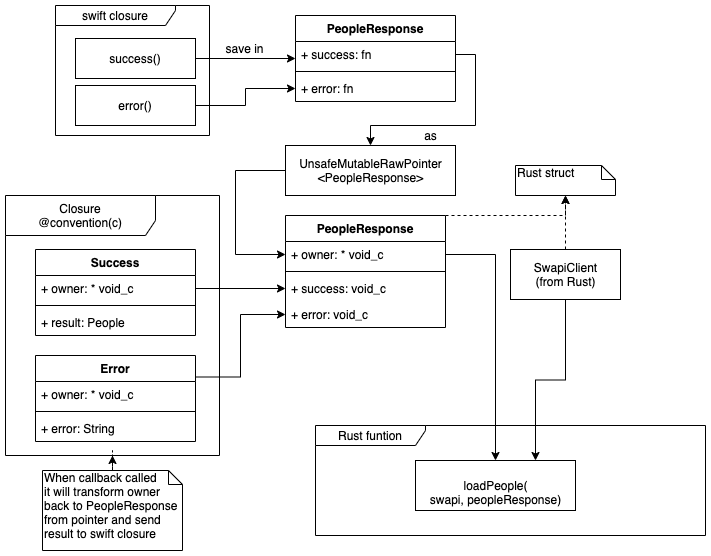
A reasonable question would be here: why do we need PeopleResponse a class in swift and corresponding PeopleCallback struck in swift? Basically to avoid this:

You need to send callback object to native code and return it back with the result:
Approach #2
In this case, we don’t use PeopleNative, we will use original People struct from Rust, but we will not expose any field to the client, instead, we will create methods that will accept a pointer to DTO and return required member. Note, we will still need to wrap arrays and callbacks as in the previous example.
Here are only getter methods, everything else is pretty the same:
1
2
3
4
5
6
7
8
9
10
11
12
13
14
15
16
17
18
19
20
//return name
pub unsafe extern "C" fn people_get_name(person: *mut People) -> *mut c_char {
    debug_assert!(!person.is_null());
    let person = person.as_ref().unwrap();
    return CString::new(person.name.to_owned()).unwrap().into_raw();
}

//Or you can accept pointer to name as param
#[no_mangle]
pub unsafe extern "C" fn people_get_name_(
    person: *const People,
    name: *mut *const c_char,
    length: *mut c_int,
) {
    debug_assert!(!person.is_null());
    let person = &*person;
    //to rebuild string you need content and lenght.
    *name = person.name.as_ptr() as *const c_char;
    *length = person.name.len() as c_int;
}
Generate headers
After you finished defining FFI you can generate header like this:
1
2
cargo install cbindgen //install cbindgen if you don’t have it
//generate a header which you need to incluede in IOS project cbindgen -l C -o src/swapi.h
As well you can create a build configuration in build.rs to automate this process:
1
2
3
4
5
6
cbindgen::Builder::new()
        .with_crate(crate_dir)
        .with_language(C)
        .generate()
        .expect("Unable to generate bindings")
        .write_to_file("src/greetings.h");
If Android {} else IOS {}
To decouple IOS and Android-specific logic, dependencies and etc. you can use macros (example):
1
#[cfg(target_os=”android”)]#[cfg(target_os=”ios”)]
The easiest way to separate concerns is to have a separate macro on top of the file — one module per platform. I found this a little messy, especially because you cannot use it in build.rs, so I separated a platform-specific logic in different projects from the core.
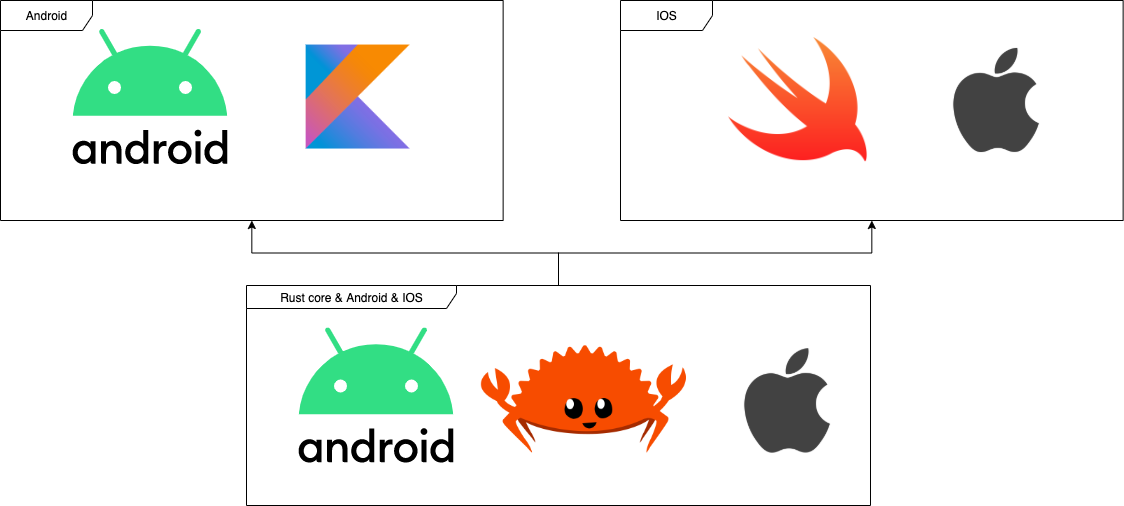
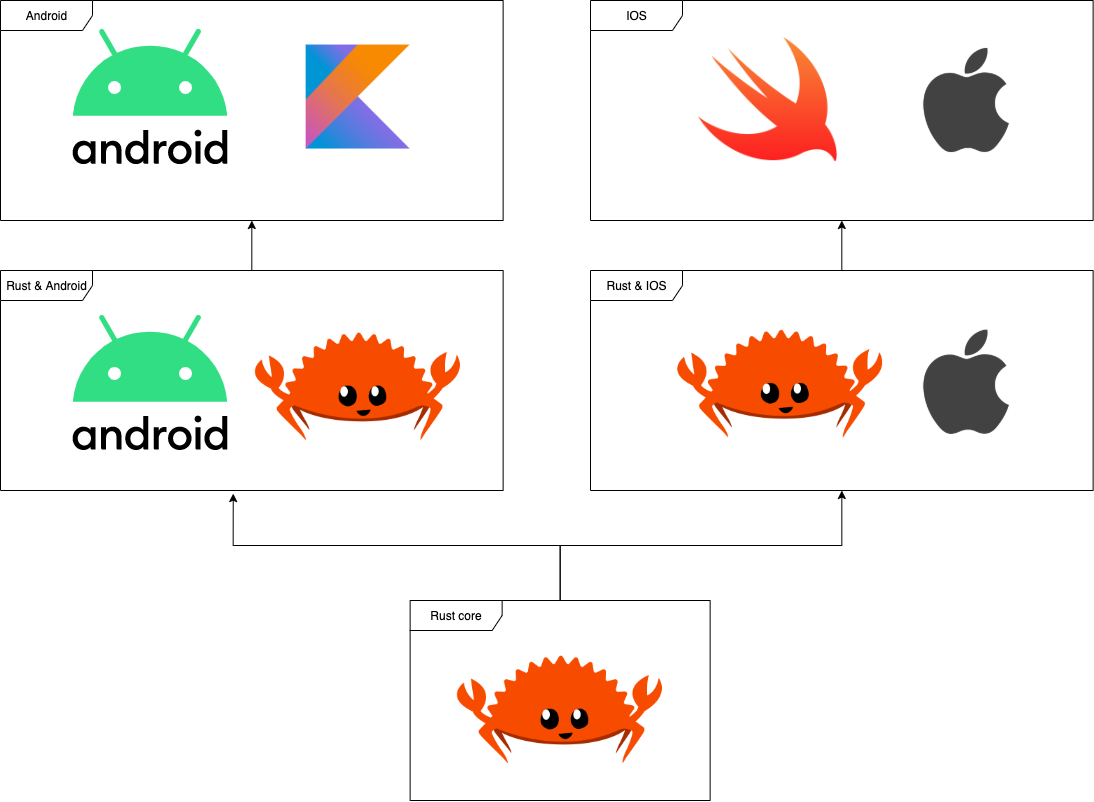
(Left to right) How you can do it & how I did.
Benchmarking
Size
Both projects measured only with Rust related code and UI.
Android debug API and shared libraries:
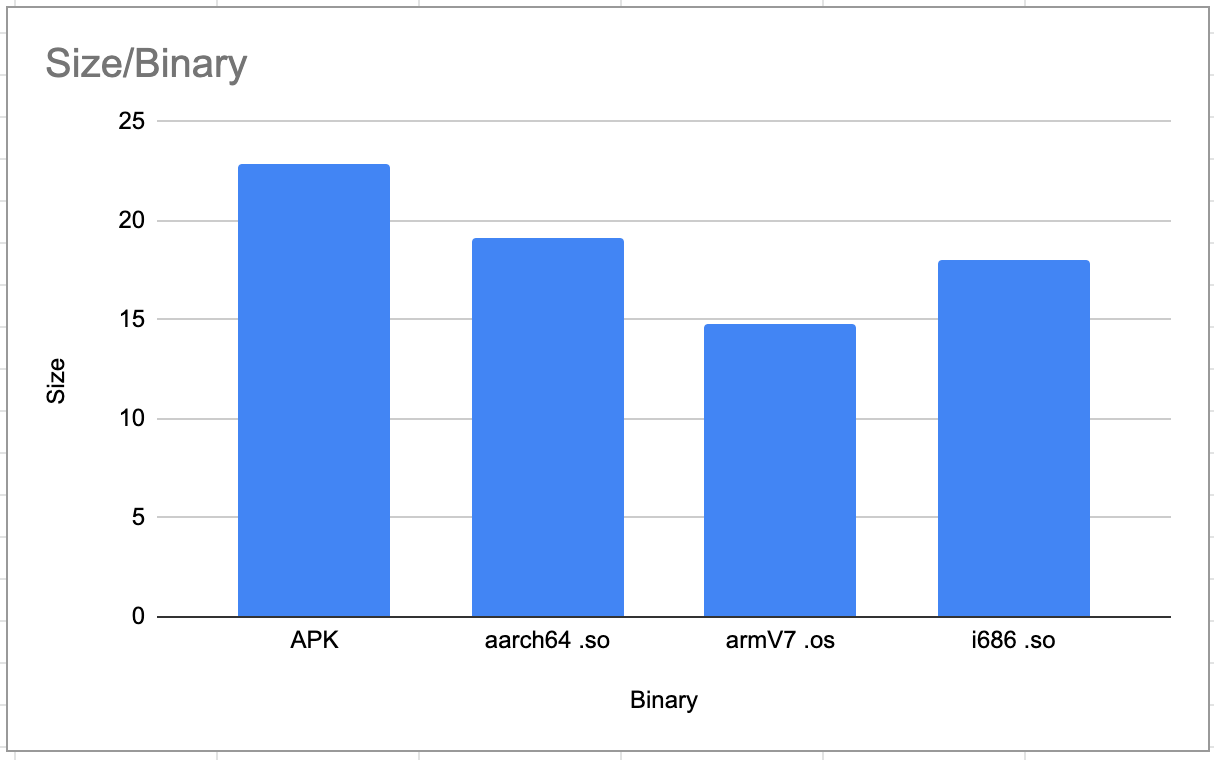
Android debug API and separately shared libraries MB
IOS debug app and shared library:
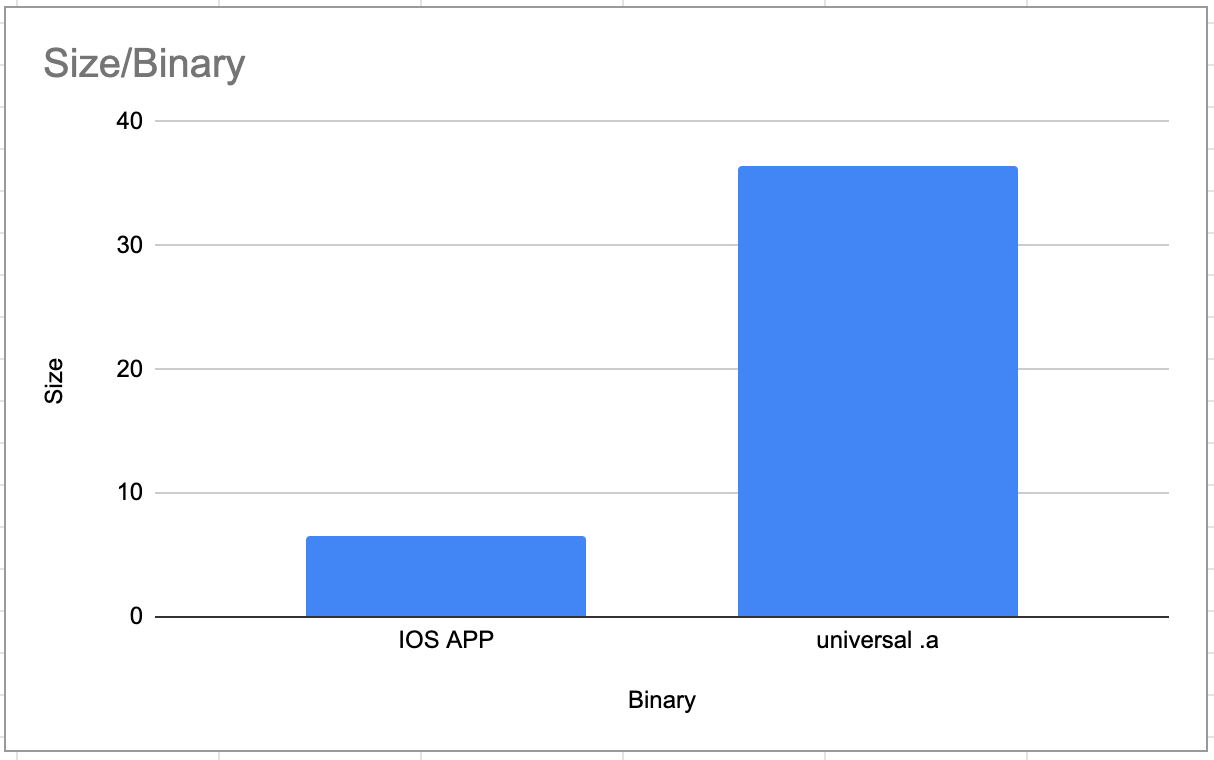
debug app and shared library size MB
Speed
Load time of Rust standalone solution, its bridges called through Android & iOS and Swift & Kotlin native solutions implementation of the same network call:
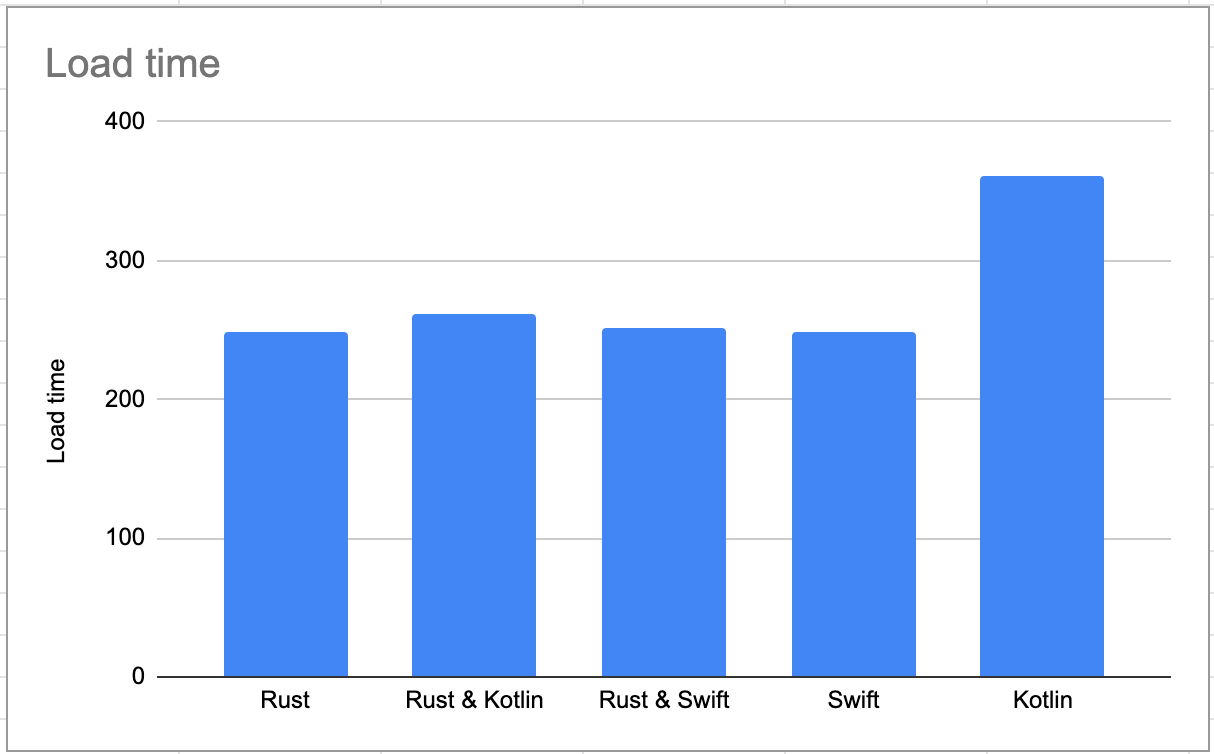
time measurements on the client-side after it received callback with serialized data
- iOS solution is using URL, URLSession, and Codable;
- Android is using coroutines with kotlinx.serialization.
As you see there almost none difference between calling Rust standalone solution or calling it through Andorid&Swift. This means that FFI doesn’t create any performance overhead.
Note: speed of request highly depends on the server latency.
You can find both implementations in the GitHub project.
Project
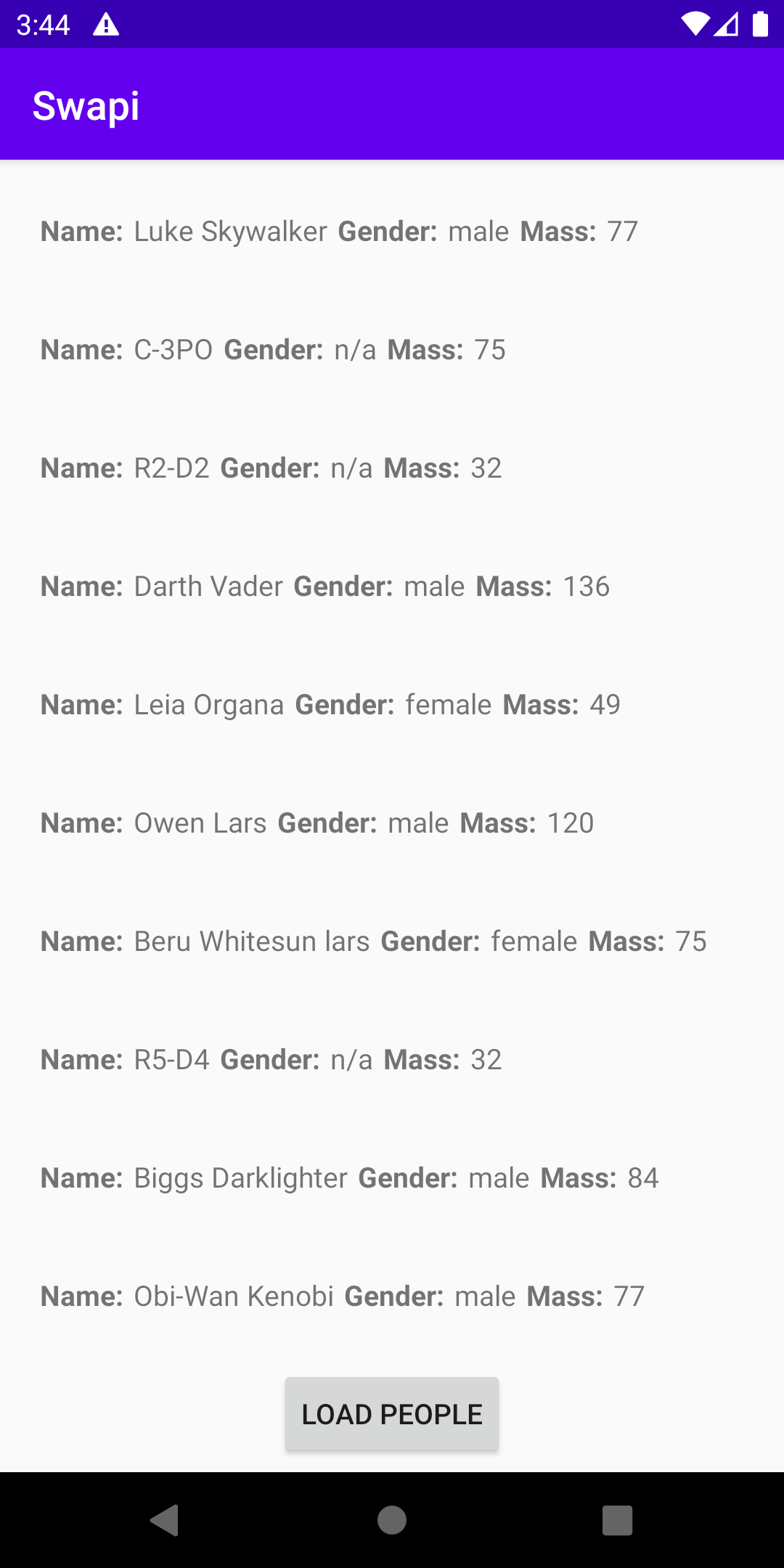
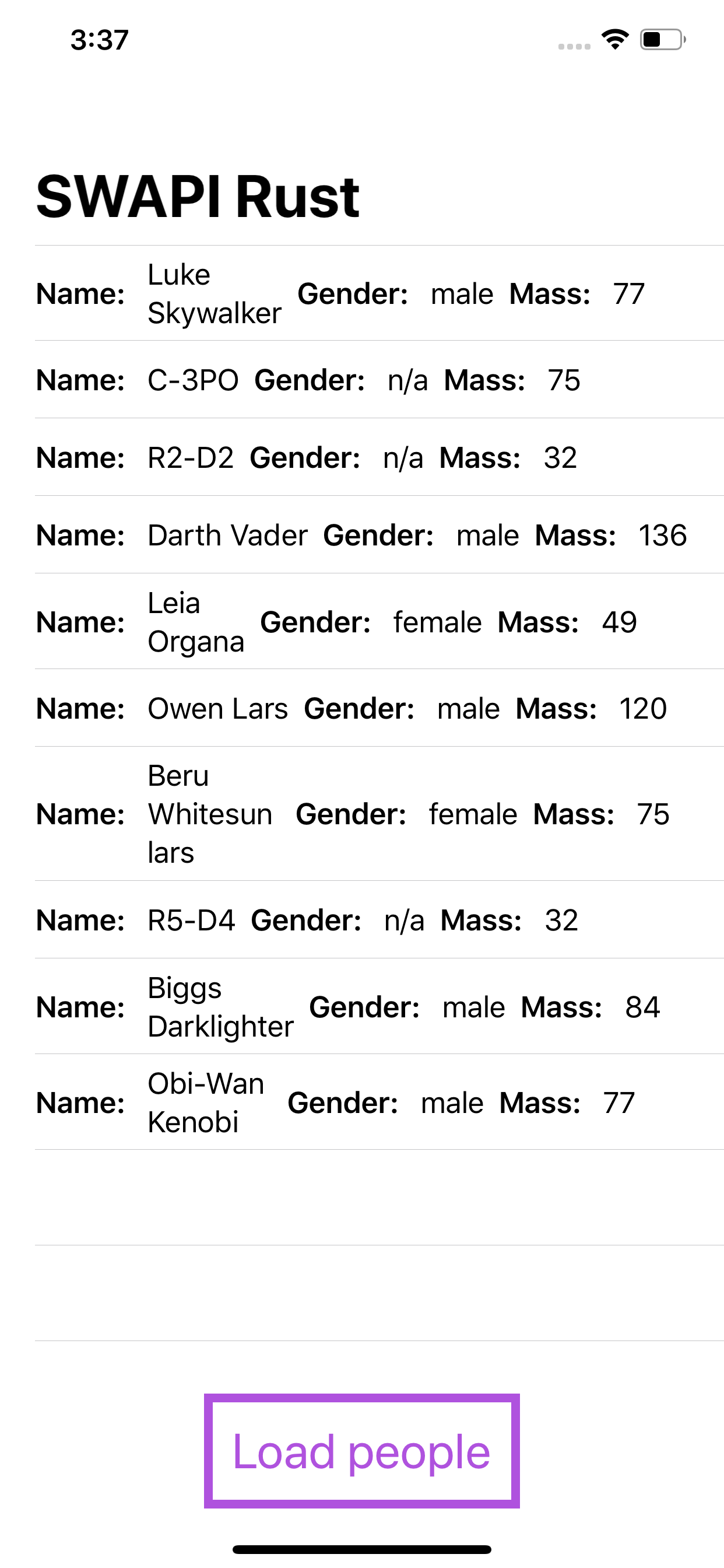
A full example of the project is available on GitHub:
🔗 xajik/rust-cross-platform-mobile
IOS & Android UI
Summary
Rust is a very promising language, that gives you extremely high speed while taking care of common to C++ memory issues. Solid and simple API makes it easy to use and learn. After building a library for Android & iOS, I would definitely pick Rust over C/C++ 🤓, but it is still more complicated than Swift or Kotlin.
The biggest challenge is to build a proper bridge between Rust and client frameworks, if you can live with it — it could be a great solution for mobile.
Reference:
My previous investigation: Go + Gomobile for Android and IOS.
Implementation and benchmarking.
🔗 GO! Golang and gomobile vs Android+Kotlin and IOS+Swift.
Originally published on Medium (The Startup). The recommendation was also shared on X in September 2020.